
Please find out what's new on the platform.

Vehicles
1) Limitation on the number of deliveries per point of sale:
A new setting that enables users to restrict the number of vehicle deliveries by type and per day is now available, optimising the organisation of secretaries and salespeople teams.
Settings / Vehicles / Synthesis / Set the maximum number of daily deliveries

If the above setting is left blank, the number of deliveries will be unlimited.
Consequently, information on the number of daily deliveries available has been added to help staff plan appointments.
This information will be visible in several ways:
- via a reminder of the number of deliveries possible per day;
- via symbols displayed on the 'Point of Sale' columns of the calendar.
Hovering over the symbols will display explanatory messages.
Please note that this information will only be available in weekly and daily formats on the calendar. It will not be possible to view it in monthly format.
Homepage-"Orders to be prepared for delivery" tile / Planning the delivery / Synthesis / Set up the delivery / Select a time slot.

It is not possible to schedule a test drive or customer appointment at the same time as delivery. This is to avoid any organisational issues.
Management
1) Extracting the list of orders placed in the 10 most efficient entities:
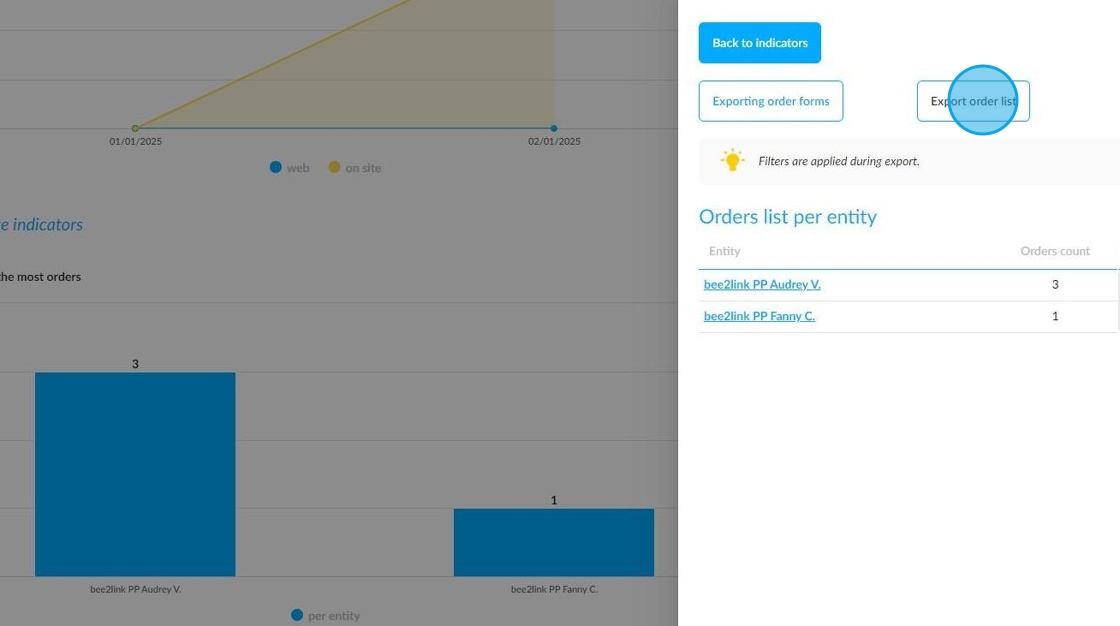
To improve sales monitoring, the table of orders related to the 'Top 10 entities with the most orders' indicator can now be exported to Excel.
Management / Dashboard / Indicators of sales opportunities / Top 10 entities with the most orders / See all entities.

Changes have been made to provide managers with two export options at this level.
The first export option already existed and enables you to export order forms in PDF format. For this update, its title has been changed to 'Exporting order forms'.
The second export is called 'Exporting order list' and allows you to export the list of orders placed by the 10 entities that have placed the most orders per point of sale over a maximum period of one month in Excel format.
Comments
0 comments
Article is closed for comments.