
Discover how to place an order for a merchant on the OpenFlex automotive and motorcycle environments.
Prerequisites:
-Own vehicles intended for automotive professionals in stock.
-Have company-type customer contacts designated as automotive professionals.

To place an order with a dealer, create an opportunity with an automotive professional.
There is a slight difference between the process for a private person and the process for a business. In the case of a private person, the step of printing out an offer is optional.
Process via a vehicle record:
From the file of a vehicle intended for a automative professional, click on the ‘Make an offer on this vehicle’ button.

Select the customer to whom the offer is addressed by entering their first name, surname, company name.

Click on "Create an oportunity with this customer".

Process via a customer file:
Select a professional automotive customer:

Click on the "New offer" button.

Choice of vehicles:
If you wish to sell a lot, click on Choose a vehicle(s).
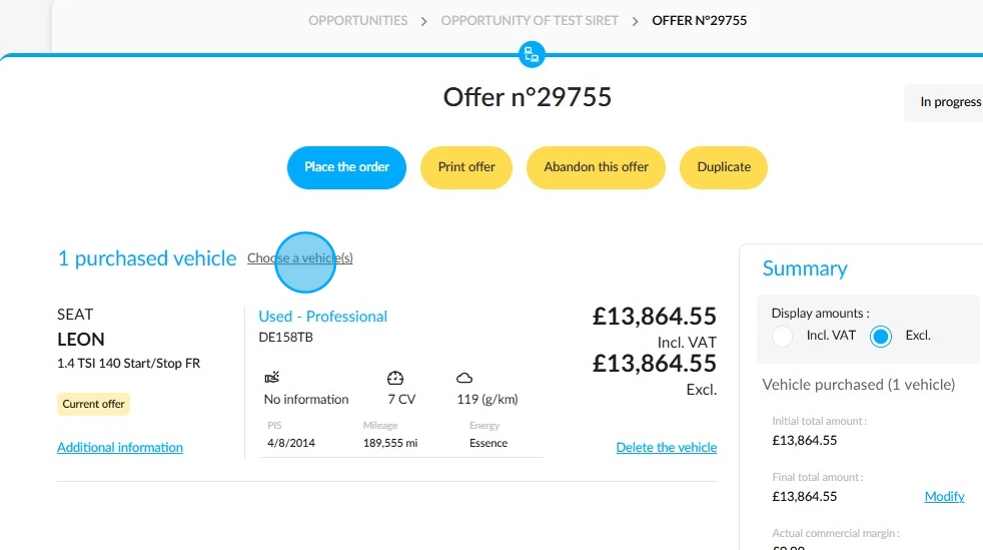
Tick the boxes next to the visuals of the UVs that you want to add to the offer and click on "Choose these vehicles".

Options for completing your order
Once you have prepared the offer, you can take various actions. You can print it, place the order directly, abandon it, or duplicate it.

Here is an example of an offer printing window:

If you prefer to proceed to the order stage without making an offer, click on "Place the order".

Make sure you have filled in the customer (1) and legal representative (2) data forms in the displayed window.

Legal representative form: numerous fields to fill in, including:
-Title
-Name
-First name
-Professional email address,
-Phone number.
Once you have filled in all the fields, click 'Finish' at the bottom of the window.

Completion of the transaction
Once you have entered all the required information, such as the delivery date and point of sale, click on the "Validate and print" button at te bottom of the page.

The offer has been finalised and this is confirmed by a notification appearing in the top right-hand corner of the screen:

This is a presentation of an order form intended for a merchant.

Comments
0 comments
Article is closed for comments.