
Find out how to exclude refurbishment costs from the calculation of the trade-in price for an automotive professional.
Prerequisites: To carry out the procedure described below, you will need administrator rights on the platform.
When setting up your pricing policy algorithm, you can decide whether to include the repair costs calculations in trade-in estimates. This enables you to adapt tariffs according to the vehicle's destination.
Go to the OpenFlex homepage. Hover over your initials and then click on "Settings".

Click on "Pricing policy" under the "Stock" heading.

Click "UV trade-in value".

Select the "UV Repair costs" option.

Next, click on the "Modify" button next to the "Professional trade-ins refurbishment costs" heading.
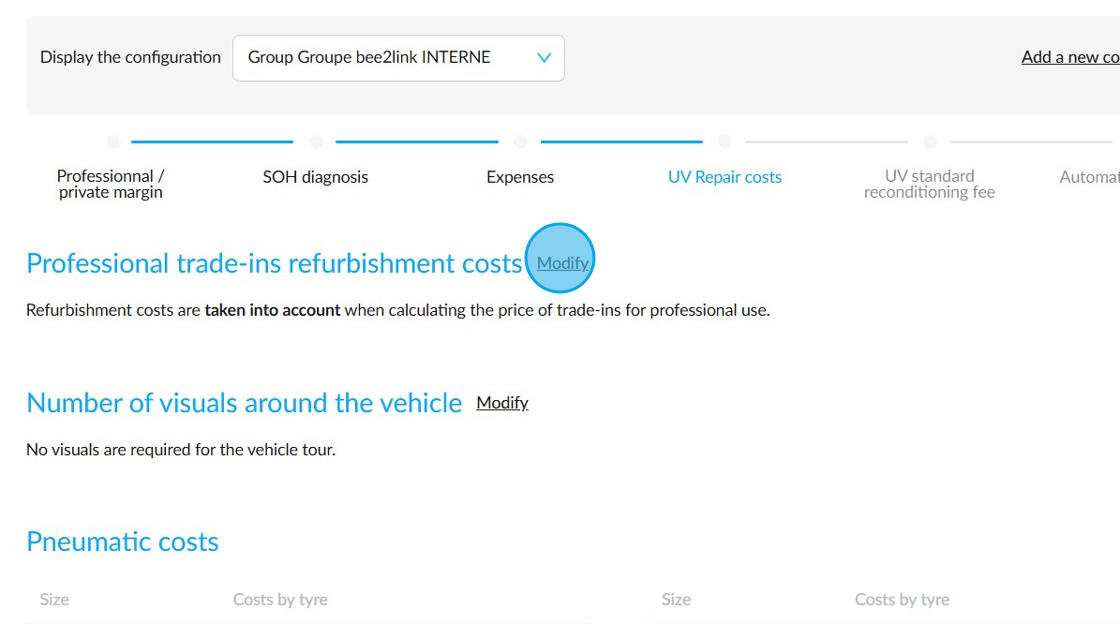
Please tick or untick the "Refurbishment costs are (not) taken into account when calculating the price of trade-ins for professional use." box.

Finally, click on the "Validate" button.

Comments
0 comments
Article is closed for comments.